What is Computer Vision, how does it transform raw images and video into real-time intelligence, and why is it becoming essential for enterprises seeking scalable, automated decision-making across operations?
Walk into any modern enterprise and you will find cameras everywhere. Warehouses. Shop floors. Stores. Streets. Hospitals. Campuses. They capture thousands of hours of video, but most of that footage is still treated like a passive archive.
That is the real problem Computer Vision solves.
A camera can record. A human can interpret. But humans cannot scale interpretation.
Picture a security operator watching a wall of 50 live feeds. They are expected to spot the one moment that matters, in the one camera that matters, at the exact second it happens. After two hours, fatigue becomes the hidden variable. After eight hours, it becomes the outcome.
Now flip the scenario. Footage is reviewed only after an incident, not before. The camera saw everything, but nobody did anything because nobody could. This is where Computer Vision turns visual data into action.
“The only path to build intelligent machines is to enable it with powerful visual intelligence, just like what animals did in evolution.”
— Fei-Fei Li
This shift is happening fast. One widely cited industry forecast estimates the Computer Vision market was USD 19.82 billion in 2024 and is projected to reach USD 58.29 billion by 2030, driven by automation demand, AI adoption, and hardware advances.
What follows is a clear, end to end explanation of Computer Vision, how it works under the hood, how it evolved, where it delivers real business value, and how Tericsoft brings it into production with Eyz AI and proven deployments like Bintix.
What is Computer Vision?
Computer Vision is a field of Artificial Intelligence that enables machines to interpret and understand visual information from images and videos. It is not just about recognizing objects. It is about extracting meaning, detecting events, and supporting decisions in real time.
Humans do this naturally. We glance at a scene and infer context. A warehouse aisle looks “blocked.” A worker looks “unsafe.” A shelf looks “empty.” We do not compute pixels. We read patterns.
Machines need a different path.
A Computer Vision system converts visual input into numeric representations, learns patterns from data, and predicts what is happening in a scene, often within milliseconds.
Computer Vision, Machine Learning, and Deep Learning
- Machine Learning gives Computer Vision the ability to learn patterns instead of relying only on handcrafted rules.
- Deep Learning makes Computer Vision powerful at scale by learning features automatically from raw data, especially through CNNs and modern vision transformers.
- Computer Vision becomes foundational to modern AI systems because vision is one of the richest data sources in the world and also one of the hardest to monitor manually.
“Just as electricity transformed almost everything 100 years ago, today I actually have a hard time thinking of an industry that I don’t think AI will transform in the next several years.”
— Andrew Ng
History of Computer Vision
The evolution of Computer Vision reflects decades of progress in mathematics, computing, and artificial intelligence. Each phase introduced new capabilities that gradually transformed machines from simple image processors into intelligent visual systems.
1960s: The Early Vision Experiments
The 1960s marked the formal beginning of Computer Vision research. Scientists explored how machines could interpret basic visual patterns using mathematical rules. Early work focused on detecting simple shapes, edges, and contours in images. These experiments established the core idea that visual perception could be modeled computationally, laying the groundwork for all future developments.
1970s–1980s: Introducing Intelligence into Vision Systems
During the 1970s and 1980s, researchers began incorporating early artificial intelligence and machine learning concepts into vision systems. This period introduced more advanced techniques such as image segmentation, motion estimation, and geometric modeling. Researchers also experimented with reconstructing three-dimensional structures from two-dimensional images, allowing machines to infer spatial relationships rather than just recognize flat patterns.
1990s: The Shift Toward Data-Driven Vision
The 1990s saw a surge in digital imagery due to digital cameras and the rapid growth of the internet. This explosion of visual data pushed Computer Vision toward data-driven approaches. Algorithms for feature extraction and object recognition became more robust, enabling systems to classify and identify objects with improved reliability. This decade marked a transition from purely theoretical research to practical experimentation at scale.
2000s: Neural Networks Enter Visual Computing
In the 2000s, increased computational power and large datasets enabled the rise of neural networks in Computer Vision. Convolutional Neural Networks (CNNs) began demonstrating strong performance in visual recognition tasks by learning hierarchical features directly from images. Vision systems expanded into real-world applications such as facial recognition, automated inspection, and early autonomous navigation.
2010s–Present: Deep Learning and Real-Time Visual Intelligence
From the 2010s onward, deep learning revolutionized Computer Vision. Large-scale datasets, GPUs, and advanced architectures dramatically improved accuracy in image classification, object detection, and video analysis. Computer Vision systems became fast enough for real-time deployment, enabling applications in healthcare diagnostics, smart retail, surveillance, and autonomous systems. Today, research continues to push toward predictive and autonomous visual intelligence.
How Computer Vision Works?
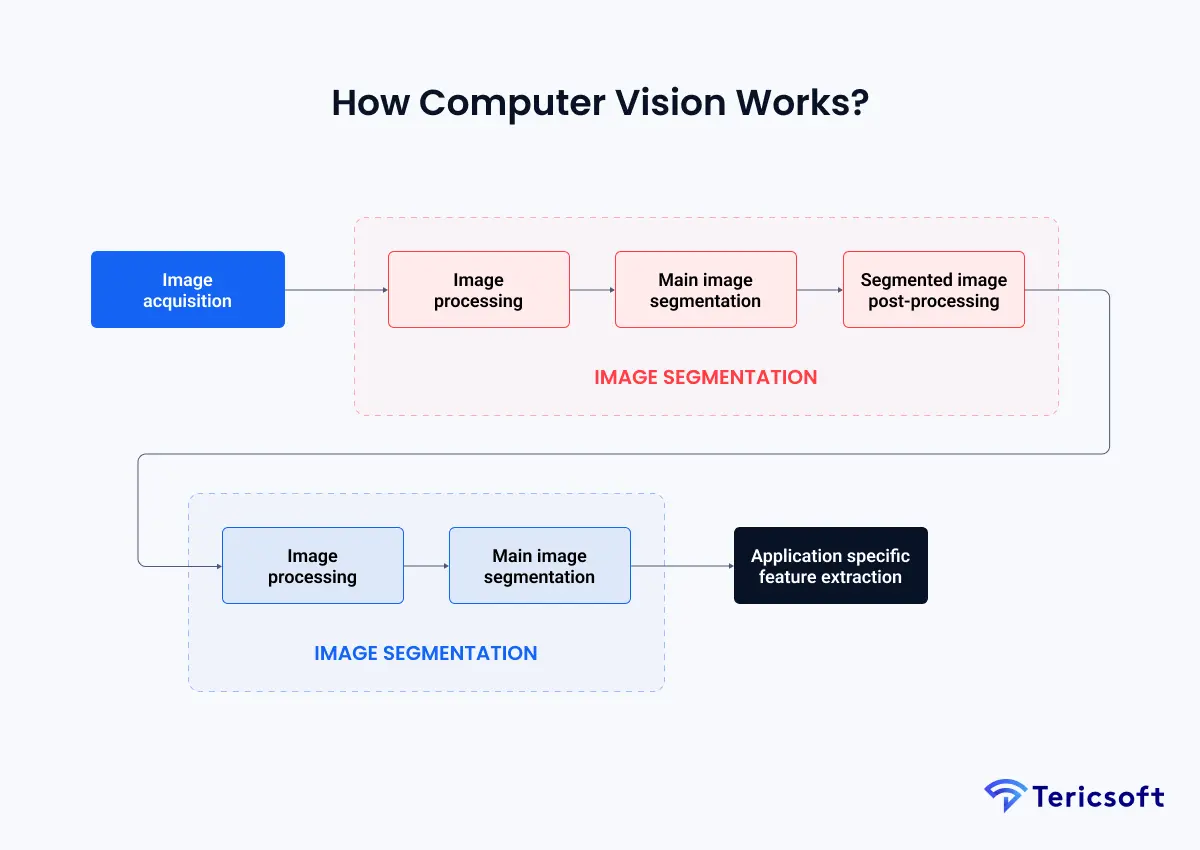
At its core, Computer Vision follows a structured, multi-stage pipeline that converts raw visual input into meaningful interpretation and action. Unlike human vision, which relies on biological intuition, Computer Vision systems depend on mathematical transformations, learned representations, and statistical decision logic. The process can be understood clearly by following the flow shown in the visual pipeline.
1. Image Acquisition
The process begins with image acquisition, where visual data is captured through cameras, sensors, drones, industrial scanners, or medical imaging devices. Each captured image or video frame is represented as a grid of pixels, with numerical values encoding color intensity, brightness, depth, and sometimes thermal or infrared information.
The quality of this stage matters deeply. Resolution, frame rate, sensor sensitivity, and camera placement directly influence how much useful information downstream models can extract. Poor acquisition limits everything that follows.
2. Image Processing and Preprocessing
Once acquired, raw images move through image processing, where they are prepared for analysis. This stage focuses on making visual data consistent and machine-friendly.
Typical operations include resizing images to standard dimensions, reducing noise, correcting lighting variations, adjusting contrast, and compensating for distortions caused by camera angles or motion. The goal is not interpretation yet, but normalization. By reducing unnecessary variability, the system ensures that later stages focus on meaningful visual patterns rather than environmental artifacts.
This stage acts as the visual equivalent of cleaning and structuring data before analysis.
3. Main Image Segmentation
After preprocessing, the system performs main image segmentation, a critical step where the image is divided into meaningful regions. Segmentation helps the system separate foreground objects from background elements and isolate areas of interest.
Depending on the application, segmentation may involve separating people from surroundings, identifying product boundaries on shelves, isolating vehicles in traffic footage, or highlighting suspicious motion zones in surveillance feeds. This step reduces visual complexity and allows the system to focus computational effort on what actually matters.
Segmentation bridges raw pixels and structured understanding.
4. Segmented Image Post-Processing
Once regions are segmented, post-processing refines those segments to improve precision. This includes smoothing boundaries, removing small irrelevant regions, merging fragmented areas, and correcting segmentation errors.
Post-processing improves the reliability of the visual data before it is passed into learning models. In real-world environments where lighting changes, shadows appear, or partial occlusions occur, this step plays a key role in maintaining stability and consistency.
5. Feature Extraction Using Convolutional Neural Networks
With clean and segmented visual input, the system proceeds to feature extraction, where learning truly begins. Modern Computer Vision relies heavily on Convolutional Neural Networks (CNNs) at this stage.
CNNs process images through layers of convolutional filters that scan small pixel neighborhoods. Early layers detect simple patterns such as edges, lines, and corners. As data moves deeper into the network, layers begin recognizing more complex structures like shapes, textures, object parts, and spatial relationships.
This hierarchical feature learning replaces older handcrafted methods and allows systems to adapt automatically to complex visual environments. CNNs convert visual data into numerical feature representations that machines can reason over.
6. Feature-Based Classification and Interpretation
Extracted features are then passed into feature-based classification models. At this stage, the system interprets what it sees.
Depending on the task, models may classify objects, identify anomalies, track motion, recognize faces, or label entire scenes. The model compares learned features against patterns it has seen during training and assigns probabilities or confidence scores to its predictions.
This stage transforms visual patterns into semantic meaning, answering questions such as what is present, where it is located, and how it is behaving.
7. Application-Specific Feature Extraction and Decision Logic
Finally, predictions flow into application-specific feature extraction and decision logic. Here, Computer Vision connects with real-world systems.
Detected events may trigger alerts, update dashboards, log incidents, initiate workflows, or activate downstream automation. In enterprise settings, this stage often integrates with security systems, operational tools, compliance platforms, or analytics pipelines.
Decision logic applies thresholds, business rules, and contextual constraints to ensure outputs are actionable, reliable, and aligned with organizational objectives.
Computer Vision is not a camera upgrade. It is an operational upgrade. It converts footage into measurable signals, and signals into decisions.
A human analogy helps: your eyes capture the scene, your brain filters what matters, and you act. Computer Vision recreates this flow using sensors, models, and automation layers.
Computer Vision Algorithms
Computer Vision algorithms sit on a spectrum from classical methods to deep learning.
Classical vision algorithms vs deep learning
- Classical Computer Vision algorithms include thresholding, contour detection, optical flow, and template matching.
- Deep learning based Computer Vision uses neural networks for detection, segmentation, classification, and tracking.
Deep learning dominates because it generalizes better in real conditions and scales across varied environments.
Object detection, classification, segmentation, tracking
- Classification answers: What is in the image?
- Detection answers: Where is it?
- Segmentation answers: Which pixels belong to what?
- Tracking answers: Where did it go over time?
YOLO for real time object detection
YOLO is widely used for real time object detection because it is optimized for speed and can run on edge devices with low latency. It is especially useful when you need immediate response, not post incident review.
Trade offs between speed, accuracy, and compute
Every Computer Vision deployment is a balancing act:
- Higher accuracy often means heavier models and higher compute.
- Edge deployments demand efficiency.
- Cloud deployments allow more compute but introduce latency and bandwidth constraints.
Computer Vision Tools and Frameworks Used in Practice
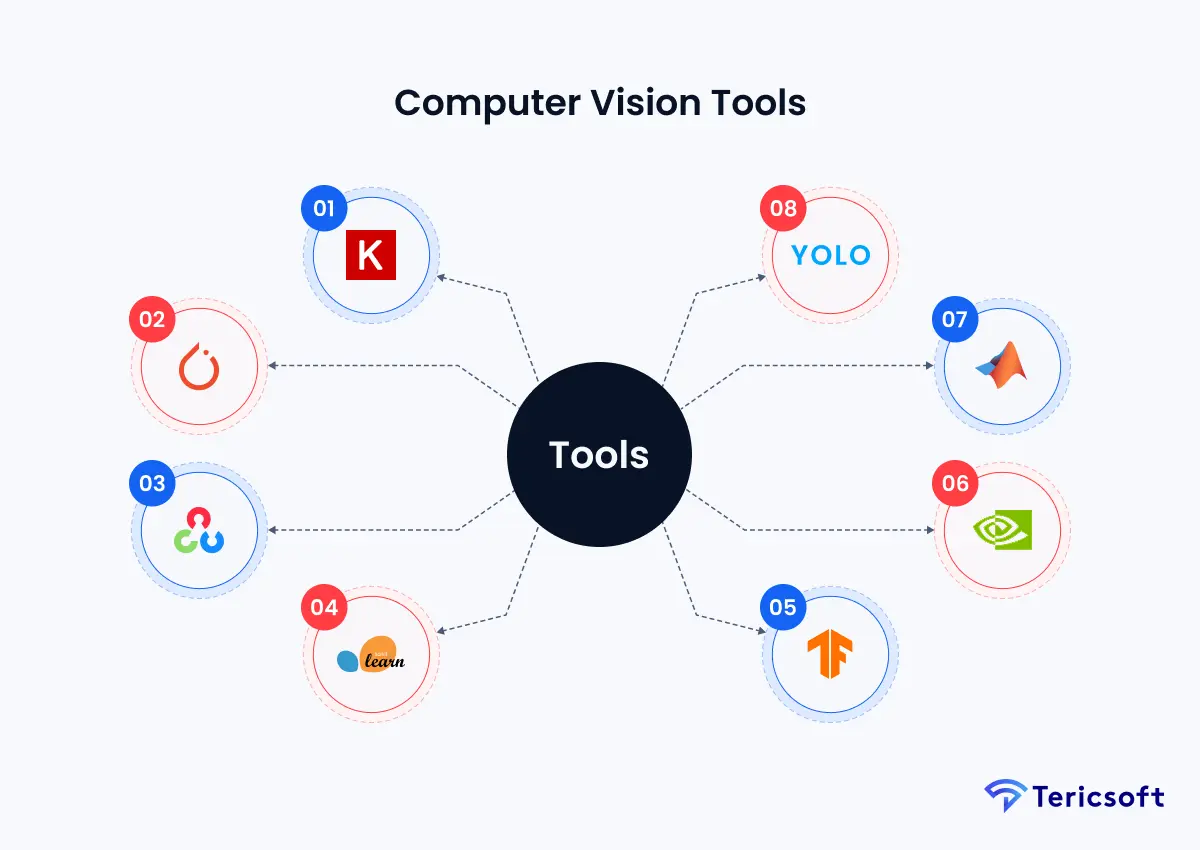
Modern Computer Vision systems are built using a carefully selected combination of software libraries, deep learning frameworks, and hardware acceleration tools. Together, these components support the full lifecycle of a vision system, from early experimentation and model training to real-time inference and large-scale production deployment. Choosing the right tools directly impacts performance, scalability, and long-term maintainability.
1. Keras
Keras is a high-level deep learning API designed to simplify the creation and training of neural networks. In Computer Vision workflows, Keras enables rapid experimentation with convolutional neural networks by abstracting complex mathematical operations behind intuitive model definitions. Engineers often use Keras to prototype architectures, test loss functions, and validate training strategies before integrating them into more optimized production pipelines.
2. PyTorch
PyTorch is a widely adopted deep learning framework favored for its flexibility and research-friendly design. In Computer Vision, PyTorch enables fine-grained control over model architectures, custom loss functions, and dynamic computation graphs. This makes it particularly suitable for developing advanced vision models, experimenting with novel architectures, and implementing state-of-the-art research ideas.
3. OpenCV
OpenCV is one of the most widely adopted libraries in the Computer Vision ecosystem. It provides highly optimized implementations for image processing, video streaming, feature extraction, geometric transformations, and camera calibration. OpenCV plays a critical role in real-time systems by handling preprocessing tasks such as frame decoding, resizing, color conversion, and motion analysis before data is passed to deep learning models.
4. Scikit-image
Scikit-image is focused on scientific image processing and analytical workflows. It offers a rich collection of algorithms for filtering, segmentation, morphology, edge detection, and feature measurement. This library is frequently used in research-oriented and precision-critical applications, including medical imaging, microscopy, and quality inspection, where fine-grained image analysis is required.
5. TensorFlow
TensorFlow is a comprehensive platform for training, optimizing, and deploying Computer Vision models at scale. It supports distributed training across GPUs and TPUs, model quantization for performance optimization, and seamless deployment to cloud, edge, and embedded environments. Enterprises often rely on TensorFlow when building vision systems that must operate reliably under high throughput, low latency, and strict operational constraints.
6. CUDA
CUDA is a parallel computing platform that enables Computer Vision workloads to leverage the massive processing power of GPUs. Many computationally intensive tasks, such as deep neural network inference, video analytics, and large-scale image processing, depend on CUDA acceleration. GPU-powered pipelines are essential for applications requiring real-time performance, including surveillance systems, autonomous navigation, and industrial automation.
7. MATLAB
MATLAB is widely used for algorithm design, prototyping, and academic research in Computer Vision. It provides a controlled environment for implementing vision algorithms, simulating complex scenarios, and visualizing intermediate results. MATLAB is often used in early research and validation phases before algorithms are translated into production-grade implementations using other frameworks.
8. YOLO
YOLO, short for You Only Look Once, is a real-time object detection framework optimized for speed and efficiency. Unlike traditional detection pipelines, YOLO processes entire images in a single forward pass, enabling fast and accurate detection of multiple objects simultaneously. This makes YOLO particularly well suited for edge deployments, smart cameras, and real-time monitoring systems where rapid response is critical.
Benefits of Computer Vision
The benefits of Computer Vision extend beyond automation, fundamentally changing how organizations perceive and act on visual information.
- Continuous, Scalable Monitoring: Computer Vision systems operate continuously without fatigue, making them ideal for monitoring environments that would overwhelm human operators. They can analyze hundreds of video streams simultaneously, ensuring consistent attention and coverage at scale.
- Faster Detection and Response: By analyzing visual data in real time, Computer Vision enables immediate detection of anomalies, safety risks, or operational issues. This reduces response times and allows organizations to intervene before incidents escalate.
- Reduced Operational Costs: Automating visual inspection and monitoring reduces reliance on large human teams. Computer Vision systems deliver consistent performance while lowering long-term labor costs and minimizing errors caused by fatigue or oversight.
- Improved Accuracy and Consistency: Unlike manual observation, Computer Vision applies the same rules and models uniformly across all data. This consistency improves reliability in tasks such as defect detection, compliance monitoring, and quality assurance.
- Actionable Insights from Visual Data: Rather than storing vast amounts of raw footage, Computer Vision extracts structured insights such as counts, trends, anomalies, and patterns. These insights support data-driven decision-making and continuous operational improvement.
One credible industry data point often used in enterprise discussions: McKinsey notes that AI based visual inspection may increase defect detection rates by up to 90 percent compared to human inspection in certain contexts.
When Computer Vision works well, it does not replace humans. It reallocates humans to where judgment matters, and lets machines handle what is repetitive.

Computer Vision Applications
Computer Vision applications become real when they map to business pain.
Retail and E-commerce
In Retail and E-commerce, Computer Vision is used for:
- Shelf monitoring and out of stock detection
- Theft detection and suspicious behavior alerts
- Customer flow and heatmaps
- Checkout queue analytics
Healthcare
In Healthcare, Computer Vision supports:
- Medical imaging analysis and anomaly detection
- Diagnostics assistance and triage support
- Workflow automation in radiology and pathology
Agriculture
In Agriculture, Computer Vision enables:
- Crop monitoring through drones or satellites
- Disease detection from leaf images
- Yield prediction and resource optimization
Manufacturing and Logistics
In Manufacturing and Logistics, Computer Vision powers:
- Defect detection and quality inspection
- Package counting and sorting validation
- Worker safety monitoring and compliance detection
The manufacturing category is where the defect detection uplift mentioned earlier becomes especially relevant.
Automotive
In Automotive, Computer Vision is core to:
- ADAS systems
- Lane detection and traffic sign recognition
- Driver monitoring and situational awareness
Security and Surveillance
In Security and Surveillance, Computer Vision supports:
- Intrusion detection
- Crowd monitoring
- Perimeter breach alerts
- Unusual behavior detection
From Monitoring to Intelligence: Eyz AI by Tericsoft
Traditional CCTV systems are passive. They record everything and interpret nothing. Humans are expected to do the interpretation later, when the cost of delay is already paid.
That is why Tericsoft built Eyz AI, a production grade Computer Vision solution that converts video streams into real time intelligence, with alerts, dashboards, and workflow integration.
What Eyz AI does in practical terms
- 24/7 real time event detection
- Unusual behavior and anomaly detection
- Alerts and notifications for action
- Historical analysis through dashboards for pattern discovery
- Integration into enterprise workflows so insights become decisions
Cameras do not fail because they cannot see. They fail because organizations cannot respond fast enough. Eyz AI closes that gap by turning visibility into action.
Case Study Spotlight: Scaling Bintix with Computer Vision
A strong way to evaluate Computer Vision is to look at scale. Not a lab demo. Not a single camera pilot. Scale.
Tericsoft partnered with Bintix to scale digital operations using Computer Vision and AI. The case study reports:
- 1 million plus pickup trips analyzed
- 10 million plus images sorted with AI and ML
- A multi year partnership focused on operational intelligence and automation
This is where Computer Vision shows its real advantage. When the input volume becomes too large for humans to interpret reliably, Computer Vision becomes the only sustainable path to consistent categorization, monitoring, and insight extraction.
If you want the full details, see the case study here: Bintix Case Study
The Future of Computer Vision
The future of Computer Vision is moving from recognition to prediction, and from dashboards to autonomous decisions.
- From reactive monitoring to predictive intelligence
Computer Vision will increasingly detect leading indicators, not just events. - Integration with LLMs and agentic systems
Vision outputs will feed language models that explain what happened, why it matters, and what to do next. - Edge AI and real time inference
More inference will happen near the camera for latency, privacy, and bandwidth reasons. - Multimodal AI combining vision, language, and action
Systems will not just detect. They will converse, summarize, and trigger workflows.
This is where Computer Vision becomes less like “image analytics” and more like “operational intelligence.”
Conclusion: Seeing Is No Longer Enough
Computer Vision is a competitive advantage because it turns your largest unstructured data stream, images and video, into decisions.
If your organization is still treating cameras as passive recorders, you are leaving intelligence on the table. The enterprises that win will be the ones that move from recording to reasoning, from monitoring to automation, and from footage to foresight.
Tericsoft builds AI driven Computer Vision systems and Eyz AI to help enterprises do exactly that, with real time monitoring, anomaly detection, alerts, and measurable operational impact.
Computer Vision is an AI field that enables machines to understand images and videos, detect events, and turn visual data into real-time decisions.
It captures visual data, preprocesses frames, learns features with models, runs inference, and improves continuously using feedback loops.
It enables 24/7 monitoring, faster anomaly detection, lower ops cost, consistent inspection, and actionable insights from video.
Used in retail shelves, healthcare imaging, manufacturing inspection, logistics counting, agriculture monitoring, and surveillance alerts.
Eyz AI turns CCTV streams into real-time intelligence with alerts, dashboards, anomaly detection, and workflow integration for action.